Repository overview
Get a visual impression of the distribution of file sizes, languages, folder structure, and architecture.
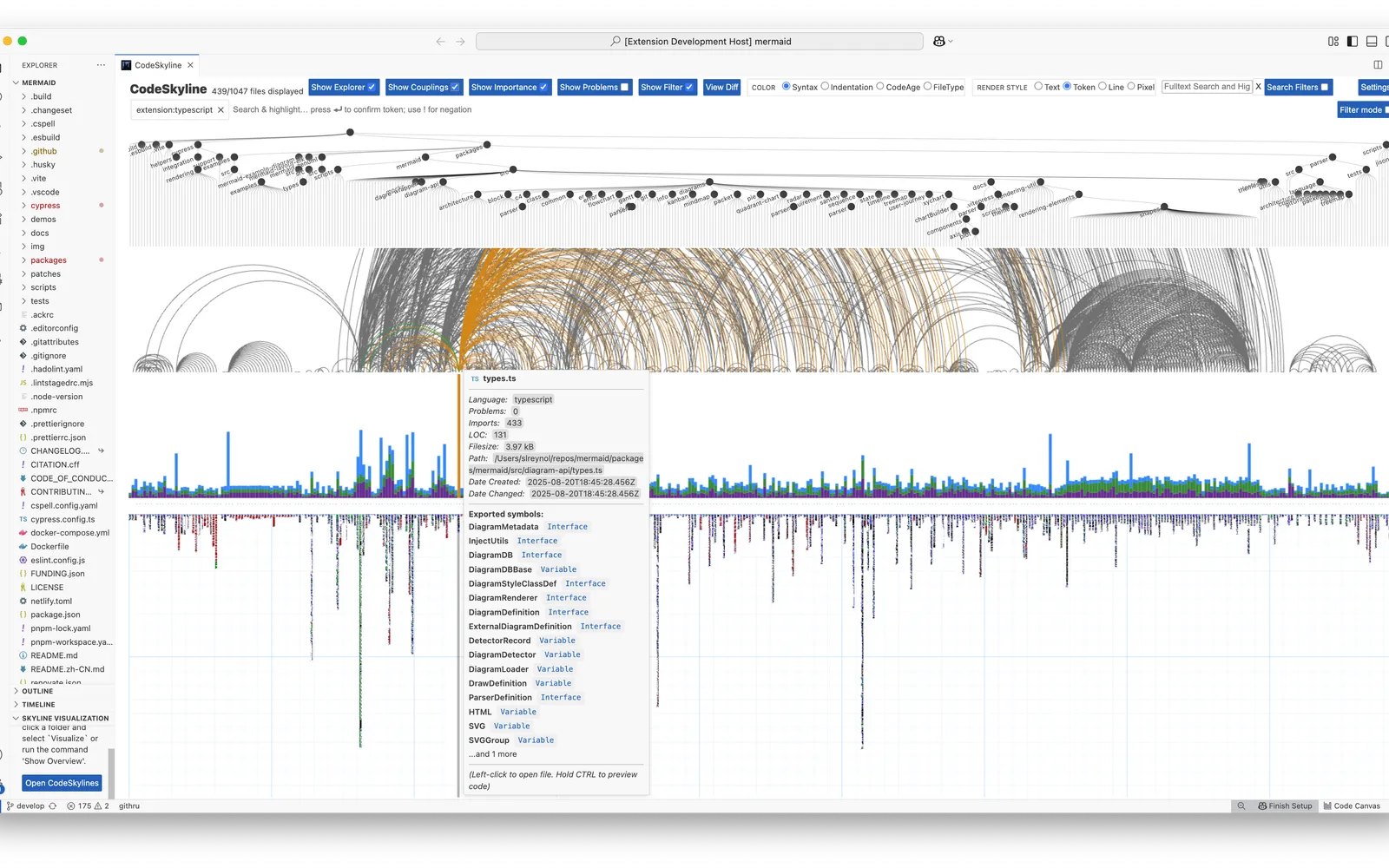
CodeSkyline is a Visual Studio Code extension that provides an interactive code-map visualization. It helps developers explore unfamiliar repositories, inspect structural relationships, and understand source code across multiple abstraction levels.

Developers have to spend substantial time navigating and understanding code before making changes. While code editors provide detailed views of individual files, they only offer limited support for understanding a repository as a whole.
CodeSkyline is a code-map visualization, where source code files are shown as a zoomed-out visual representation. Think of it like printing all files, hanging them on a wall and viewing them from a distance, or taking all editor minimaps and putting them together into one view. This shows all source code at once and different color schemes help to analyse and explore regions of interest.
The x-axis of each file is aligned with the folder hierarchy, arcs that show imports, and the centrality of files. This connects the code-level with the architecture-level. Furthermore, it also features multiple interactions to view details, filter data, view different metrics, and full-text search.
We provide CodeSkyline as a Visual Studio Code extension. It processes data locally and has no telemetry. Feel free to try the online web demo or install it. If you are interested in what we do, reach out below.
Get a visual impression of the distribution of file sizes, languages, folder structure, and architecture.
Use search and color schemes to discover code, complexity, authorship, code age, churn, and code problems.
Compare coupling patterns and centrality to identify highly connected files, dependency clusters, and refactoring candidates.
Use data from Git to investigate file histories, and compare versions in diffs.
CodeSkyline is an active research project and has appeared in at least the following publications:
To install in VS Code, open the Extension tab (CTRL+SHIFT+X) and search for "CodeSkyline" or install directly from the VS Code Marketplace.
CodeSkyline does not use telemetry. Analysis runs locally using files from the current workspace, language-server data, and optional local Git data.
This research was supported by the National Research Center for Applied Cybersecurity ATHENE. ATHENE is funded jointly by the German Federal Ministry of Research, Technology and Space and the Hessian Ministry of Science and Research, Arts and Culture.



Please do not hesitate to contact us! We are interested in discussing how visual analytics can enhance your software engineering, cybersecurity, or data analysis workflows.